
Add your shift schedule to the iPhone Calendar
A DuPont cycle is 28 days, and the iPhone Calendar can repeat an event every 28 days. It takes 14 events, one for each shift of the cycle.
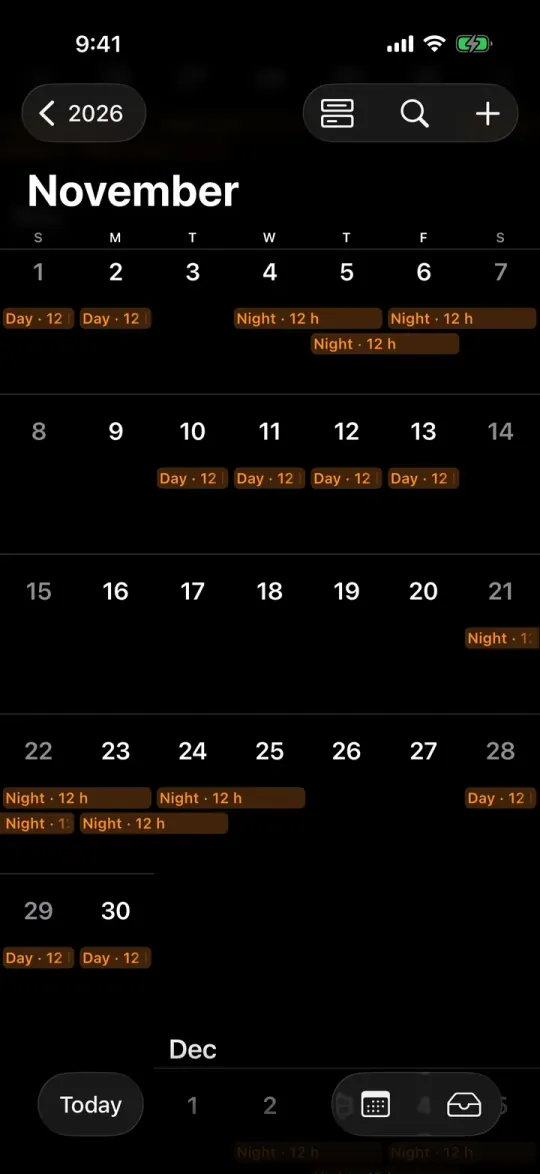
TurnoRest Pro filled this November from one switch. Day 1 was September 26.

How to add a shift pattern to the iPhone Calendar
Make one event for each shift in the first cycle, then set each one to come back when the cycle does.
Start on day 1
Open Calendar, go to the first day of your cycle, tap + and add the first shift with its start and end times. A night from 7 PM to 7 AM is one event that ends the next morning.
Set Repeat to Custom
Tap Repeat, then Custom. Choose Daily for Frequency and put the length of the cycle in Every, 28 days on DuPont or 3 on a Kelly 24/48. End Repeat stays on Never (iPhone Life’s walkthrough).
Give every shift its own event
Each shift of the first cycle needs its own event and its own repeat, so DuPont is 14 of them.
| Rotation | Repeating events |
|---|---|
| DuPont28-day cycle | 14every 28 days |
| Pitman 2-2-328-day cycle | 14every 28 days |
| Panama 2-2-314-day cycle | 7every 14 days |
| 4 on 4 off16-day cycle | 8every 16 days |
| 2 days, 2 nights, 4 off8-day cycle | 4every 8 days |
| Kelly 24/483-day cycle | 1every 3 days |
| Continental 2-2-328-day cycle | 21every 28 days |
Counted on the rotations as TurnoRest draws them. A Kelly 24/48 with a Kelly day every seventh shift runs 21 days, so it’s six events every 21 days.
Where repeating events fall short
Repeats keep the pattern. Swaps, leave and overtime you type in yourself.
- A swap or a day of leave
- You change or delete that one occurrence, and the rest of the series stays as it was. Apple’s Calendar guide for the Mac shows the same choice.
- Overtime and picked-up shifts
- Each one is a new event on its own. Nothing in the calendar adds up the hours.
- A new day 1 or a new rotation
- The old series have to end and new ones begin. On DuPont that’s 14 events again.
- No repeats at all
- Typed one by one, 2027 on DuPont is 182 or 183 events, depending on day 1. Continental 2-2-3 has 8-hour shifts and more of them, 273 or 274.
- The night the clocks go back
- In the US the clocks go back at 2 AM on November 1, 2026. If your event’s title has the hours in it, like “Night 12h”, the repeat still says 12 on October 31, a night that lasts 13. TurnoRest titles that one Night · 13 h, and the shift pay calculator pays all 13.
Subscribed calendars and .ics files
If your employer’s scheduling system gives you a calendar link, add it as a subscription. Open Settings, tap Apps, then Calendar, then Calendar Accounts, and tap Add Account. Under Other, tap Add Subscribed Calendar and paste the link (Apple’s iPhone User Guide).
An .ics file is a copy, not a subscription. Opening one from Mail imports its events, as the same guide says.
TurnoRest has no link to subscribe to. There’s no account and no server of ours holding your schedule, which stays on your iPhone and in your own iCloud (the privacy policy has the details).
You can make a link for an iCloud calendar. Turn on Public Calendar for it and send the link, and anyone who has it can subscribe and view it without changing it (Apple’s guide to sharing iCloud calendars).
Apple’s guides and iPhone Life’s walkthrough were read on September 27, 2026.
TurnoRest Pro syncs your shifts to the iPhone Calendar
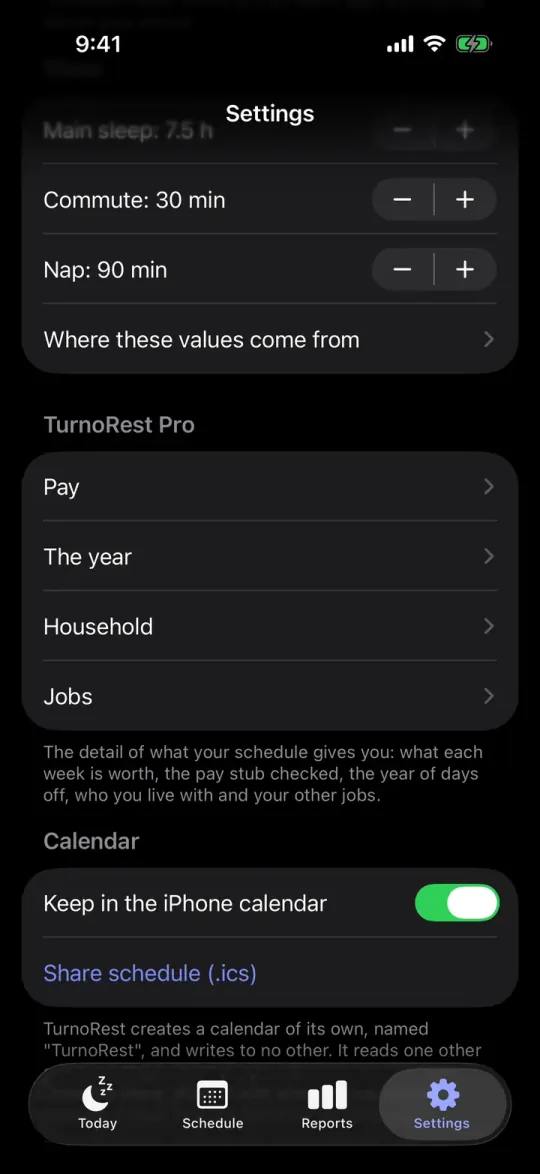
In TurnoRest, open Settings and turn on Keep in the iPhone calendar, under Calendar. The app makes a calendar named TurnoRest and writes your shifts into it, from 30 days back to 120 ahead. It writes to no other calendar.
Every shift is one event, titled the way the app names it: Night · 12 h, Day · 12 h. A shift from a second job has the job’s name in front. Swap a shift and its event moves. Stay two hours late and it gets two hours longer. Change rotation and the old events are deleted.
iOS asks for full access to your calendars. The app needs it to read back its own events, and it reads one other calendar only if you pick one in Household.
Share schedule (.ics), under the switch, makes a file of the same days for someone without an iPhone. It’s a copy, so later changes don’t reach it.
Switching off deletes the TurnoRest calendar. If Pro ends, the events already there stay and stop changing.
Calendar sync and the .ics file are in Pro, which costs $34.99 a year in the US, or $5.99 a month. The rotation and the sleep plan stay free.
Questions
Can I add a shift pattern to the iPhone Calendar?
Yes, with repeating events. Add each shift of the first cycle once, then set it to Repeat, Custom, Daily, every as many days as the cycle is long. A 4 on 4 off pattern is eight events, each every 16 days.
How do I add my work rota to my iPhone calendar?
The same way, with the rota’s own cycle. On 2 days, 2 nights, 4 off it’s four events that repeat every 8 days: the two days and the two nights.
The 2 days, 2 nights, 4 off rota is drawn in the generator for any year.
Is there a shift work app that syncs with the iPhone calendar?
TurnoRest does, with Pro. It writes your rotation into a calendar of its own on the iPhone and changes the events when your shifts change. Setting up the rotation in the app costs nothing.
Can the person I live with see my shifts?
Yes, if you share the calendar. TurnoRest creates it in the account your new events go to. When that’s iCloud, open the list of calendars in Calendar, tap the info button next to TurnoRest and tap Add Person with their email. Turn Allow Editing off, so the shifts only change when TurnoRest changes them.
If they use TurnoRest too, Household in Pro reads the calendar they share with you and puts their shifts next to yours. It counts an event as a shift when it has a start time and lasts at least 3 hours.
What happens to the calendar if I stop paying for Pro?
The events already in it stay, and they stop changing. To remove them, delete the TurnoRest calendar in the Calendar app. Delete Calendar is at the bottom of its info screen.
Why does TurnoRest ask for full access to my calendars?
To update its own calendar it reads back the events it wrote. Without that, every change to your schedule would add your shifts a second time. It writes only to the TurnoRest calendar, and it reads one other only if you pick one in Household.
One switch instead of 14 repeating events.
Put your rotation and day 1 into TurnoRest for free. Pro writes the shifts into the iPhone Calendar and changes the events when your shifts change, from $2.92 a month billed yearly.
DuPont in the iPhone Calendar
1 switch
instead of 14 repeating events, each every 28 days
- Calendar
- TurnoRest, on its own
- Days written
- 30 back, 120 ahead