
Support
Write to support@turnorest.com. In the app, Talk to us in Settings sends the same email with your app and iOS versions already in it. Em português
If something isn’t working
Pro isn’t showing on this phone
In TurnoRest, open Settings, then Subscription and tap Restore purchases.
Reminders don’t arrive
In the iPhone’s Settings, open Notifications, then TurnoRest and turn on Allow Notifications.
The shifts don’t line up with work
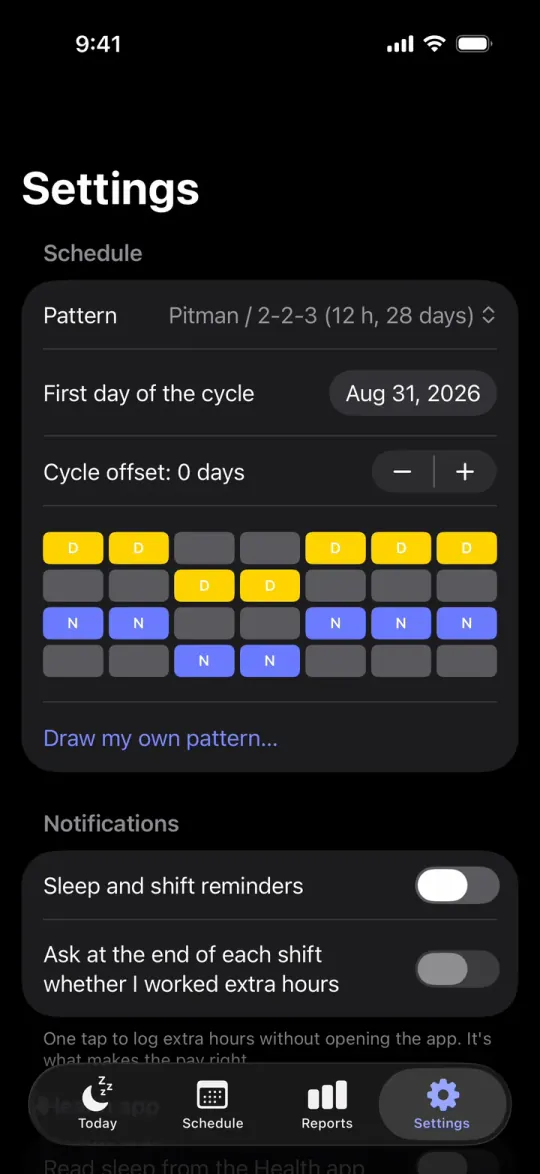
In TurnoRest, open Settings, then Schedule and check First day of the cycle.
Getting started
Which rotations does TurnoRest have, and what if mine isn’t one?
Eight are built in: DuPont, Pitman 2-2-3, 4 on 4 off, Metropolitan 2-2-2, Continental 2-2-3, Panama 2-2-3, Kelly 24/48 and fixed days, Monday to Friday. Any other cycle, of any length, goes in with Settings › Schedule › Draw my own pattern…: one row per day of the cycle, one or more shifts per day, and the app repeats it. If your cycle still doesn’t fit, pick None of these fit under the list and describe it. Schedules the app can’t draw yet are the emails that help most.
My shifts change every schedule. Can I use TurnoRest?
Yes. Draw a one-week pattern with no shifts in Settings › Schedule › Draw my own pattern…, then add each shift as your schedule is posted: tap the day in Schedule, pick the type, the start and the length. Then pick Over 40 h a week as the overtime rule in Settings › Pay: under Against the schedule, per day, the app’s default, a shift added to a day off counts as overtime in full. Fixed nights, like four 10-hour nights a week, don’t need this: draw them once as a pattern.
How do I find the first day of my cycle?
Pick any date on which you worked the first shift of the pattern, in the past or coming up, in Settings › Schedule › First day of the cycle. Then compare the next two weeks in Schedule with the schedule posted at work. If everything is one day off, the stepper under the date moves the whole pattern a day at a time. The date is saved without a time zone, so the rotation never slips a day when you travel.
Can I import my schedule from work?
No. TurnoRest has no account and no server, so it can’t connect to your employer’s system, and it doesn’t read spreadsheets, PDFs or photos. Pick the closest pattern, set the first day, and change the single days that differ. When your schedule is posted fresh every month, keep a base pattern and change each day as it’s posted: redrawing the pattern redraws past weeks too, and last month’s hours and pay would change with it.
Changes to a day
I stayed late. How do I put that in?
In Schedule, tap the day the shift started (for a night, the evening you went in), pick Extra and set how long you stayed, a quarter hour at a time. The app keeps the shift as posted and the one you worked, moves the sleep after it, and checks the rest before your next shift again. A new change to a day replaces the old one, so nothing is ever added twice.
How do I put in a swap or a shift I picked up?
On a day off, tapping the day opens a new shift: pick its type, start and length. A swap within the same day is Swap. A swap across two days is two edits: Cancel on the day you give, and a new shift on the day you take. Before you save, the sheet shows how many measures the change makes worse; which ones, and what it pays, are part of TurnoRest Pro.
A shift was canceled. What do I do?
Tap the day, then Cancel, then Save. The day becomes a day off, its reminders stop and the widget shows your next shift instead. Reset to the pattern puts the posted shift back.
Can one day have two shifts?
A split shift that comes every cycle belongs in the pattern: in Draw my own pattern…, give that day a second shift. A one-off double that runs straight on from the first shift goes in as Extra. A second shift after a break, outside the pattern, can’t be put in on its own in this version. The break between the two halves of a split shift isn’t counted as rest.
Pay
How do I set up my pay?
Open Settings › Pay and type your Hourly rate, then each differential as a percentage of it: night work, Saturday, Sunday (the same as Saturday until you change it) and overtime. No US law sets a night premium, so they all start at zero; your contract has the numbers. For time and a half, overtime is +50%, because the hours themselves are already in base pay. Setting all of this up is free, and so is this week’s total on Today; the line items, pay periods, the pay stub check and What if are part of Pro. The shift pay calculator runs the same math in the browser.
Which overtime rule should I pick?
The one your contract or pay stub uses; the app can’t know it. Against the schedule, per day counts what you worked beyond the schedule each day. Over 40 h a week is the federal line. The two 28-day rules are for fire and police departments under the §207(k) exemption. Under the three rules with a threshold, overtime is paid on the regular rate, which includes your differentials, as federal law asks. Four overtime rules works each one through with numbers.
How does the pay stub check work?
Turn on Count by pay period in Settings › Pay, pick the frequency and your next payday. The app ends each period on payday, so if your check comes a few days after the period closes, enter the period’s last day as payday: the check then covers the same days as your stub. Open a period in Periods and pay stubs, type the Gross on pay stub and tap Save pay stub. The app doesn’t flag a gap within 1% of the total (or $1, if that’s more), because payroll rounds. On a two-week period that comes close to an hour of pay, so if your stub is short by more than cents, check your hours against it. A bigger gap is compared with every combination of the line items, and the app names the one that matches it: it says a line matches, never that payroll left it off. How the pay stub check works has worked examples.
Sleep and reminders
Why is my sleep window at that time?
Every window is kept clear of your shifts plus the commute each way, 30 minutes unless you change it in Settings › Sleep. After a night, sleep starts when you get home; before a day shift it’s counted back from when you leave. Each tip names the study behind it, and the night shift sleep planner shows the whole method with every source.
Why don’t reminders arrive?
In the iPhone’s Settings, under Notifications, then TurnoRest, check that Allow Notifications is on. The reminder to leave for a shift is time-sensitive, so a Focus lets it through when Time Sensitive Notifications is on for TurnoRest and the Focus allows them. Open TurnoRest once after a change: reminders are scheduled on the phone, two weeks ahead. On a new phone, turn them on again in Settings › Notifications.
Why isn’t sleep from Apple Health confirming my windows?
The app reads sleep only after you turn on Read sleep from the Health app in Settings, and it never writes to Health. iOS doesn’t tell apps whether you allowed the read, so check in the iPhone’s Settings, under Health, then Data Access & Devices, then TurnoRest. Only time recorded as asleep counts, it has to cover at least half of the window, and the comparison runs when you open Today.
Why is the widget blank or out of date?
A widget fills in once a pattern is set up: finish the setup, or check Settings › Schedule › Pattern. iOS decides how often widgets refresh; opening TurnoRest once sends your latest change to the widget.
Your data
Is there an account? Where is my schedule kept?
There’s no account and no password. Your schedule lives on your iPhone and, if the phone is signed in to iCloud, in your own private iCloud, which only your Apple Account can read. The app also saves a backup file on every change, in Files › TurnoRest › Backups. The privacy policy lists each kind of data and where it’s kept.
I got a new phone. Where is my schedule?
If the Sync line in Settings on the old phone said On via iCloud, the schedule comes back once the new phone is signed in to the same Apple Account; leave the app open on its first screen for a few minutes, then open it again. If it said This device only, move a backup file by hand:
- On the old phone, open Settings › Backup › Export schedule (JSON) and send the file to yourself.
- On the new phone, open Settings › Backup › Import from file and pick that file.
Reminders, Apple Health reading and the calendar sync are kept on each phone, so turn them on again.
What happens when I travel, or the clocks change?
Shifts keep their posted clock times in the time zone the iPhone is set to. On the night the clocks change, a night shift is as long as it really is, an hour more or less, and the pay counts the real hours; the long-shift warning looks at the posted times, so the change alone never sets it off. To keep seeing your home times while visiting somewhere else, set the iPhone’s time zone by hand under General, Date & Time.
How do I delete everything?
There’s no single button, because there’s no server holding your data. Cancel any running plan first, then: turn off Settings › Calendar › Keep in the iPhone calendar if you used it; delete the Backups folder in Files › On My iPhone › TurnoRest; delete the app; and delete its iCloud copy in the iPhone’s Settings, under your name, iCloud, Manage Account Storage, TurnoRest. For the purchase record RevenueCat keeps under an anonymous ID, write to support@turnorest.com.
Purchases
Why isn’t Pro showing on this phone?
- Check that the App Store is signed in with the Apple Account that bought Pro.
- Open Settings › Subscription › Restore purchases.
The lifetime purchase always needs this step on a new phone, because it has no renewal to bring it back on its own. If it says “No purchases found for this Apple Account”, the account signed in didn’t buy Pro: check which one it is in the iPhone’s Settings, under your name, then Media & Purchases.
How do I cancel, and what keeps working?
Open Settings › Subscription in TurnoRest and tap Continue to cancel, or cancel in the iPhone’s Settings, under your name, then Subscriptions (Apple’s steps). Pro stays until the end of the period you paid for. After that the free part keeps working: the schedule and every change to it, sleep windows, reminders, rest warnings, widgets, Siri and this week’s total. The lifetime purchase was paid once, so there’s nothing to cancel.
What if I bought the lifetime purchase while a plan was still running?
Apple sells them as separate products, so buying one never cancels the other: the plan keeps renewing until you cancel it in the iPhone’s Settings, under your name, then Subscriptions. To avoid paying for both, cancel the plan first and buy the lifetime purchase once it has ended; nothing you set up is lost in between.
Can my family use Pro?
Family Sharing isn’t supported, so Pro works only for the Apple Account that bought it. Anyone can download TurnoRest and use everything free. To show your days off to the people you live with, share the month as an image from Schedule, which is free.
How do I get a refund?
Apple handles refunds for every App Store purchase, at reportaproblem.apple.com.
About TurnoRest
Is there an Android, iPad or web version?
No. TurnoRest is for iPhone only, with iOS 17 or later. This site works out its examples with the app’s rules, but it doesn’t hold your schedule.
Why can’t I find it in the App Store?
TurnoRest isn’t sold in the European Union or in Brazil. Everywhere else, search for TurnoRest on an iPhone, or use the link at the top of any page of this site.
Who makes TurnoRest, and who reads my email?
TurnoRest is made by one independent developer, and there’s no support team in between: your email reaches the person who builds the app. Settings › Talk to us writes it for you, with the app version, iOS, the phone model, your pattern and your plan, and you see all of it before you send. It holds no dates, names or pay. Or write to support@turnorest.com.